Thought Leader Ads Guide 2026: How to Put Your Brand in Front of Your Dream Customers and Make Them Trust You on LinkedIn — Starting at €10/Day
Written by
Niklas Götz
April 13, 2026


Introduction
Let's be honest for a second. You're putting in the work on LinkedIn. Writing thoughtful posts, sharing real insights, showing up consistently. But the people you actually want to reach, your dream customers, never seem to engage. And you have no idea whether they even see your content.
This guide will show you how to fix that. With a simple, proven approach called Thought Leader Ads that puts your content directly in front of the people who matter, starting at just €10 per day.
You're Posting Consistently. So Why Aren't You Getting Leads?
You're doing everything right. You're showing up on LinkedIn, writing thoughtful posts, sharing insights from your actual experience. You're not one of those people who posts a motivational quote and calls it a day. You're genuinely trying to build something here.
And it's working... kind of. You're getting likes. Comments. Maybe even some nice DMs from people telling you how great your content is.
But take a look at who's actually engaging. It's your peers. Other founders. Marketing people. Friends who want to support you. And that's nice, really. But it's not why you're on LinkedIn.
The people you actually want to reach, your dream customers, the ones who could buy from you tomorrow if they knew you existed? You have no idea whether they ever see a single post.
And that's a frustrating place to be. Because the content is good. You know it's good. But good content alone doesn't pay the bills.
So what's going on? Why does it feel like you're doing everything right but still not getting the results you want?
It comes down to two things.
Your content distribution is not in your hands.
Here's something most people don't think about enough: when you publish a post on LinkedIn, you don't decide who sees it. The algorithm does.
And look, the LinkedIn algorithm isn't bad. It's actually gotten a lot better at showing content to relevant people. But at the end of the day, you have zero control over whether your dream customers specifically are in the audience that LinkedIn chooses to show your post to.
You might write the perfect post that speaks directly to CFOs at mid-market SaaS companies. But if the algorithm decides to show it to your network of marketing friends instead? That's what happens. And there's nothing you can do about it.
This means you're spending hours every week creating content, and you're essentially hoping that the right people happen to see it.
And the worst part? You can't even tell. LinkedIn doesn't show you whether your dream customers saw your post. You see total impressions, sure. But "10,000 impressions" means nothing if none of them are from the people you actually want to reach.
So you keep posting. Keep putting in the effort. And keep wondering whether any of it is actually moving the needle with the people who matter.
Even if they see your content, the math doesn't work.
Let's say you get lucky. Let's say the algorithm does show some of your posts to some of your dream customers. Even then, you've got a math problem.
Only 5% of your market is ready to buy right now. This comes from the Ehrenberg-Bass Institute, one of the most respected marketing research institutions in the world. They call it the 95-5 rule: at any given time, only about 5% of your potential buyers are actively in the market for what you sell. The other 95% might need what you offer eventually, but not today.
Think about what that means. If your content randomly reaches, say, 20 of your dream customers in a given month, statistically only 1 of them is even thinking about buying right now. One. And even that one person has barely seen your name before.
Which brings us to the second part of the math problem.
B2B buyers need a lot of touchpoints before they buy. According to Gartner, the average B2B purchase involves 27 touchpoints before a decision is made. For high-ticket services and products (deals over $100K), that number jumps to 47 or more.
Twenty-seven touchpoints. That means a potential customer needs to see your name, your face, your ideas over and over and over again before they even start to consider you. Not once. Not five times. Dozens of times.
And when you're relying on an algorithm to randomly distribute your posts? You can't guarantee that any single dream customer sees you more than once or twice. Maybe they catch one post this week. Maybe another one three weeks from now. That's not enough to build familiarity. It's definitely not enough to build trust.
The bottom line: this is why so many founders are stuck on LinkedIn. They're doing the hard work of creating great content. They're showing up consistently. But the system they're relying on simply can't deliver the results they need.
Not enough dream customers see their content in the first place. And even the ones who do, don't see it often enough to build the kind of trust that leads to a conversation.
And that's exactly the problem Thought Leader Ads solve.
The Solution — Thought Leader Ads
So if the problem is distribution, the solution has to fix distribution. And that's exactly what Thought Leader Ads do.
But before we get into it, let's clear something up. Because when most people hear "LinkedIn Ads," they immediately think of those awkward sponsored posts with stock photos and a "Download our whitepaper" button. The ones you scroll past without even thinking. The ones that feel like ads.
Thought Leader Ads are not that.
A Thought Leader Ad takes one of your existing LinkedIn posts, a post you already published from your personal profile, and puts paid distribution behind it. That's it.
It shows up in your target audience's feed looking exactly like a regular post. Your name, your profile picture, your words. There is a small "Promoted by [your company]" label underneath your name, but it's so subtle that most people don't even notice it. Everything else looks and feels like a normal organic post.
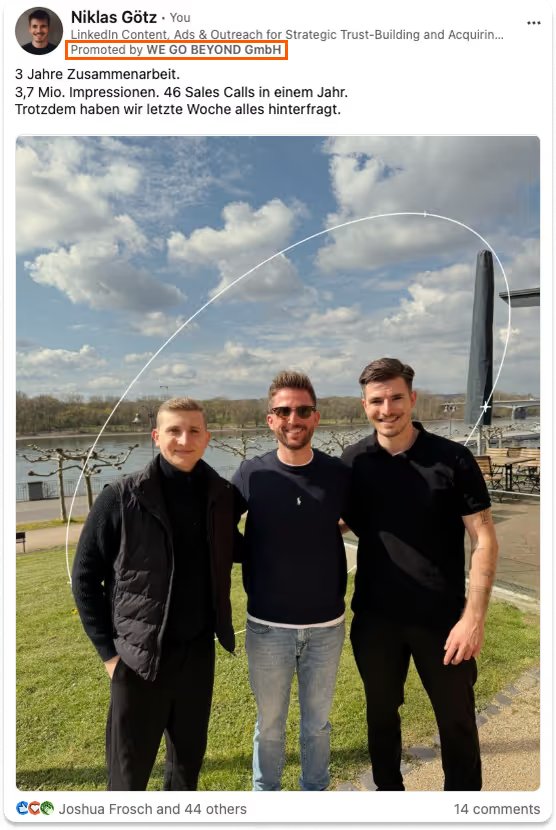
Your dream customers scroll through their feed, see your post, and it feels like they just happened to come across it naturally. They don't feel marketed to. They feel like they discovered you.
And that's the whole point. Because there's a massive difference between how people react to content that feels organic versus content that feels like an ad.
Think about your own behavior on LinkedIn for a second. When you see a post from a real person sharing a genuine insight or experience, what do you do? You probably slow down. Read a few lines. Maybe read the whole thing if it's interesting.
Now think about what happens when you see something that clearly looks like an ad. A polished graphic, a corporate logo, a call-to-action button. You scroll right past it. You don't even register what it said. It's like your brain has built a filter that automatically ignores anything that looks like it's trying to sell you something.
That's actually a real phenomenon called banner blindness. We've all been exposed to so many ads that our brains have learned to tune them out completely. It doesn't matter how good your message is if it's wrapped in a format that people have been trained to ignore.
Thought Leader Ads bypass that filter entirely. Because they don't look like ads. They look like a founder sharing their thinking. Which is exactly what they are. You just made sure the right people get to see it.
Remember the two reasons your content wasn't working?
Problem 1 was distribution. You couldn't control who sees your content. With Thought Leader Ads, you can. You define exactly who your dream customers are, by job title, company size, industry, even specific companies, and LinkedIn shows your content to those people. Not random people. Not your marketing friends. The exact audience you want to reach.
Problem 2 was the math. Not enough touchpoints with the same people. With TLAs, you're not hoping that someone sees your post once by accident. You're making sure they see your content repeatedly over weeks and months. You're building the kind of frequency that actually creates familiarity and trust. The 27 touchpoints that Gartner talks about? You can actually engineer that now instead of leaving it to chance.
You go from hoping the right people find you to making sure they can't miss you.
But isn't this just boosting posts?
Not quite. And the difference matters. When you boost a post on LinkedIn, you're essentially throwing money at LinkedIn's general ad system and hoping for the best. The targeting is basic, the optimization is generic, and you're often paying for reach that doesn't matter.
Thought Leader Ads are run through LinkedIn's Campaign Manager, which gives you access to the full power of LinkedIn's targeting. You can build laser-focused audiences. You can control frequency. You can test different posts against each other. You can retarget people who've already engaged with your content.
Boosting a post is like shouting into a crowd while Thought Leader Ads feel like having a conversation with the right person.
Getting Set Up
Before you can run your first Thought Leader Ad, you need a few things in place. Nothing complicated, nothing expensive. Most of it takes about 15 minutes.
What you need:
- A LinkedIn company page. If you don't have one yet, create one. It doesn't need to be fancy. Your company name, a logo, a one-liner about what you do. That's enough. The company page is required because all LinkedIn ads are technically run through a company page, even if the ad itself shows your personal post from your personal profile.
- Admin access to that company page. You need to be an admin on the page so you can connect it to Campaign Manager. If someone else set up your company page, ask them to add you as an admin. Super Admin, Content Admin, or Sponsored Content Poster all work.
- Your personal LinkedIn profile. This is where your content lives. The posts you publish from your personal profile are what you'll turn into Thought Leader Ads. So if you're not posting yet, start. You don't need dozens of posts to get going. Even three to five solid posts are enough to launch your first campaign.
- A credit card. LinkedIn charges you for ad spend. At a minimum spend of €10/day, we're talking about €300 a month. That's it. But you can only pay by credit card.
Setting up Campaign Manager:
LinkedIn Campaign Manager is the tool you'll use to create and manage your Thought Leader Ads. It's separate from your regular LinkedIn experience, and if you've never used it before, it can feel a bit overwhelming at first. Don't worry. You only need to know a fraction of what's in there.
Here's how to get started:
- Step 1: Go to Campaign Manager. You can find it by clicking "For Business" in the top navigation on LinkedIn, then selecting "Advertise." Or just go directly to linkedin.com/campaignmanager.
- Step 2: Create an ad account. If you've never advertised on LinkedIn before, you'll be prompted to set up an ad account. Give it a name (your company name is fine), select your currency, and link it to your company page.
- Step 3: Add your payment method. Go to account settings and add your credit card and billing details. LinkedIn charges you based on actual spend, so you'll only pay for what you use.
That's it. You now have everything you need to run Thought Leader Ads. The account is live, it's connected to your company page, and you're ready to go.
In the next section, we'll build the audience you want to reach. Because a great ad shown to the wrong people is still a waste of money.
Building Your Dream Customer Audience
This is where Thought Leader Ads really start to shine. Because in high-priced B2B, your target group is naturally small. You're not a consumer brand trying to reach millions of people on Meta. You're selling a specialized product or service to a very specific type of person at a very specific type of company.
And that's actually great news. Because it means you can define exactly who should see your content and make sure you reach all of them. Repeatedly. Week after week. Until your name is the first thing they think of when they need what you sell.
There are two ways to build your audience in LinkedIn Campaign Manager. We'll start with the one we recommend.
Option A: Upload a Company List (our recommendation)
The most precise way to target your dream customers is to upload a list of the exact companies you want to reach.
Think about it. You probably already know which companies would be a perfect fit for what you offer. Maybe it's 200 SaaS companies in a specific revenue range. Maybe it's 500 agencies in your niche. Maybe it's a list of companies you've been eyeing for months.
You can take that list and upload it directly into LinkedIn Campaign Manager as a "Matched Audience." LinkedIn matches the company names and domains from your list against its database and builds an audience out of everyone who works at those companies.
One important note: always upload a company list, not a person list. Person-based lists match on email addresses, and that often causes problems. A lot of professionals use personal email addresses on LinkedIn rather than their work email, which means your match rate drops significantly. Company lists match on company name and domain, which is far more reliable.
LinkedIn makes the upload pretty straightforward. In Campaign Manager, go to "Plan" in the left sidebar, then "Audiences," then "Create Audience", select "Matched Audience" and then "Company/Contact." You'll find a CSV template there that shows you exactly what format LinkedIn expects. Fill in your company names and domains, upload the file, and give LinkedIn about 48 hours to process the match.
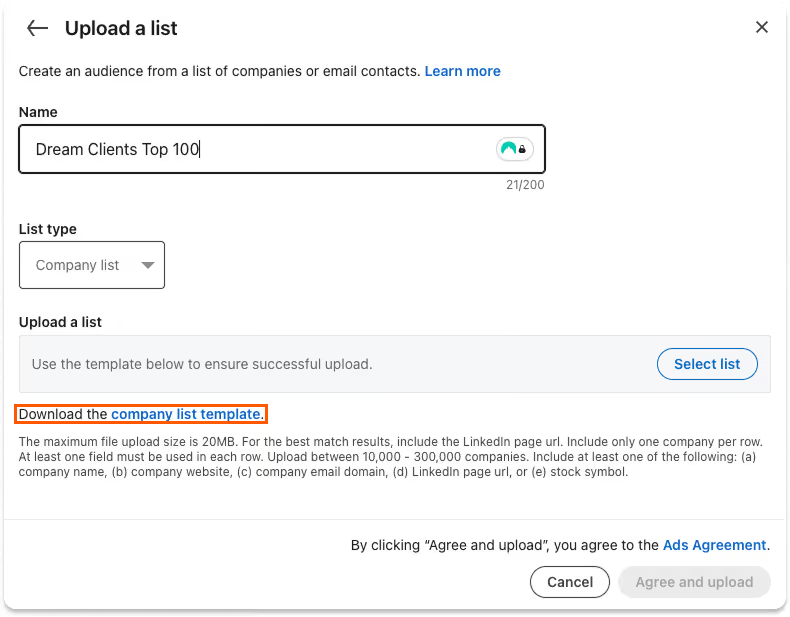
For the full step-by-step details, LinkedIn's official documentation walks you through the entire process.
There are several ways to build your company list:
- Export from your CRM. If you already have target accounts or prospects in your CRM, that's the easiest starting point. Export them, clean up the data, and upload.
- Use research tools. AI tools like Claude Code and databases like Apollo are great for building targeted company lists based on criteria like industry, revenue, employee count, tech stack, funding stage, and more.
- Build it manually. If your target market is small enough, sometimes the best approach is to sit down and list the companies you actually want to work with. It takes a bit of time, but the result is a highly intentional audience.
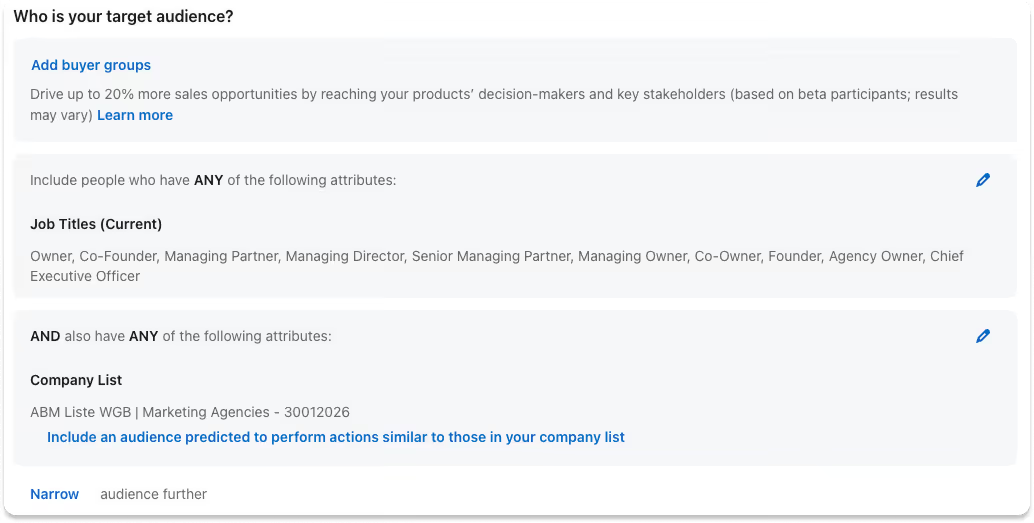
Once your company list is uploaded, you can layer LinkedIn's native targeting filters on top within the campaign. For example, you might upload a list of 300 SaaS companies but then narrow your audience to only reach C-level executives or VP-level decision makers at those companies. That way you're not just reaching the right companies but the right people within those companies.
Option B: Use LinkedIn's native targeting
If building a company list feels like too much to start with, that's totally fine. You can also build your audience using LinkedIn's built-in targeting options and still get good results.
Here's what you have to work with:
- Job title (e.g., "CEO," "Head of Marketing," "VP Sales")
- Job function (e.g., Marketing, Sales, Finance)
- Seniority level (e.g., VP, Director, C-Suite)
- Industry (e.g., Software, Financial Services, Manufacturing)
- Company size (e.g., 51-200 employees, 201-500 employees)
- Geography (country, region, or city)
You can combine these filters to build a focused audience. For example: "Heads of Marketing at software companies with 50 to 500 employees in the DACH region." That's already a pretty specific audience.
Native targeting isn't as precise as uploading a curated company list. You'll inevitably include some companies that aren't a great fit and miss some that are. But it works, especially when you're just getting started and want to test the waters before investing time into building a perfect list.
How big should your audience be?
This matters more than most people think. Too broad and you're wasting budget on people who will never buy. Too narrow and LinkedIn doesn't have enough room to deliver your ads effectively.
The sweet spot is between 2,000 and 10,000 people.
And that's people, not companies. This is an important distinction because you're building a company list, but your audience size is determined by how many people at those companies match your targeting filters.
Here's how to think about it. Say you're targeting three roles at each company: the CEO, the CMO, and the CFO. That's 3 people per company. If you want an audience of around 3,000 people, you need roughly 1,000 companies on your list. Want to reach 6,000 people? That's about 2,000 companies.
We usually aim for a company list of 500 to 2,000 companies, which gives you an audience in that sweet spot depending on how many roles you're targeting per company.
Your budget needs to match your audience size. For a smaller audience of around 2,000 people, you can start with the minimum daily budget of €10/day and still build decent frequency. For larger audiences of 5,000 to 10,000 people, you'll need €20 to €60 per day (roughly €600 to €1,800 per month) to maintain enough frequency. We'll walk you through the exact budget calculation in a later section so you can figure out the right number for your specific situation.
The key idea is this: it's better to reach 3,000 of the right people ten times each than to reach 30,000 random people once. Frequency with the right audience is what builds trust. One-time visibility doesn't do much.
Now that you know who you want to reach, let's set up your first campaign. That's where we'll actually create the audience in Campaign Manager, pick the right posts to promote, and get everything live.
What We're Actually Trying to Achieve
Before we dive into buttons and settings, let's get crystal clear on what we're optimizing for. Because if you don't understand the goal, every decision in Campaign Manager becomes a guessing game.
And let's set the right expectations upfront: Thought Leader Ads are not a direct response mechanism. This is not like selling a €30 protein shake with a single Meta ad where someone sees it, clicks, and buys. You're selling B2B products and services worth tens of thousands of euros. Those kinds of decisions are not made spontaneously. Nobody sees one LinkedIn post and thinks "let me sign a €50K contract with this person I've never heard of."
That's why a simple "book a call with us" ad won't work in B2B. What does work is investing in long-term brand presence. Showing up consistently in your dream customers' feeds so that when they eventually have a need, you're the person they think of.
Think of Thought Leader Ads as a brand investment, not a campaign with an end date. They compound over time. The first month, not much happens. By month three, people start recognizing your name. By month six, they feel like they know you. And that's when the inbound starts.
With that mindset, here's what we're optimizing for. Two things:
1. Saturate your audience
We want to reach as many people in your target audience as possible. Not some of them. As many as we can.
Remember the 95-5 rule from earlier? Only 5% of your market is ready to buy at any given time. That means if you're only reaching a small slice of your audience, the chances of hitting someone who's actually in-market right now are tiny. But if you're reaching most of your audience consistently, the odds shift dramatically in your favor.
Think of it this way: if your audience is 3,000 people and you're reaching 1,500 of them every month, you're likely getting in front of 75 people who are actively looking for what you sell right now. That's 75 potential conversations. If you're only reaching 200 people, that number drops to maybe 10. The math is simple but powerful.
2. Maximize frequency
Reaching someone once isn't enough. You need to show up in their feed repeatedly. We aim for 5 to 7 touchpoints per month with each person in your audience.
Why? Two reasons.
First, trust. People buy from people they feel they know. And feeling like you know someone requires seeing their face, their name, and their ideas more than once. Repeated exposure is how you go from "who is this person?" to "oh yeah, I see their stuff all the time" to "I should probably talk to them."
Second, mental availability. This is a concept from marketing science that simply means: when someone has a need, who comes to mind first? If a CFO realizes they need help with their go-to-market strategy and your name has been showing up in their feed five times a month for the past three months, you're the person they think of. If they've seen your name once two months ago, you don't even exist in their memory.
Mental availability is the ultimate competitive advantage. You don't need to be the best option. You need to be the option they think of first.
So our formula is: high saturation + high frequency = maximum trust and mental availability.
Everything we set up in the next section serves these two goals. Every targeting decision, every budget choice, every bidding strategy. Keep this in mind as we go through the details.
Creating Your First Campaign
Time to get your hands dirty. In this section, we'll walk through the entire setup step by step. Open LinkedIn in another tab and click along as you read.
Start by clicking "Advertise" in the left-hand menu on LinkedIn. This takes you to Campaign Manager.
Step 1: Create a campaign
Click "Create" and then "Campaign." This is the top-level container for everything that follows.
Give it a clear name. Something like "Thought Leader Ads" works fine. You can always rename it later.
Now choose your campaign objective. For Thought Leader Ads, you have two options:
- Brand Awareness — optimizes for visibility. LinkedIn tries to show your ad to as many people in your audience as possible.
- Engagement — optimizes for clicks. LinkedIn tries to show your ad to people who are most likely to interact with it.
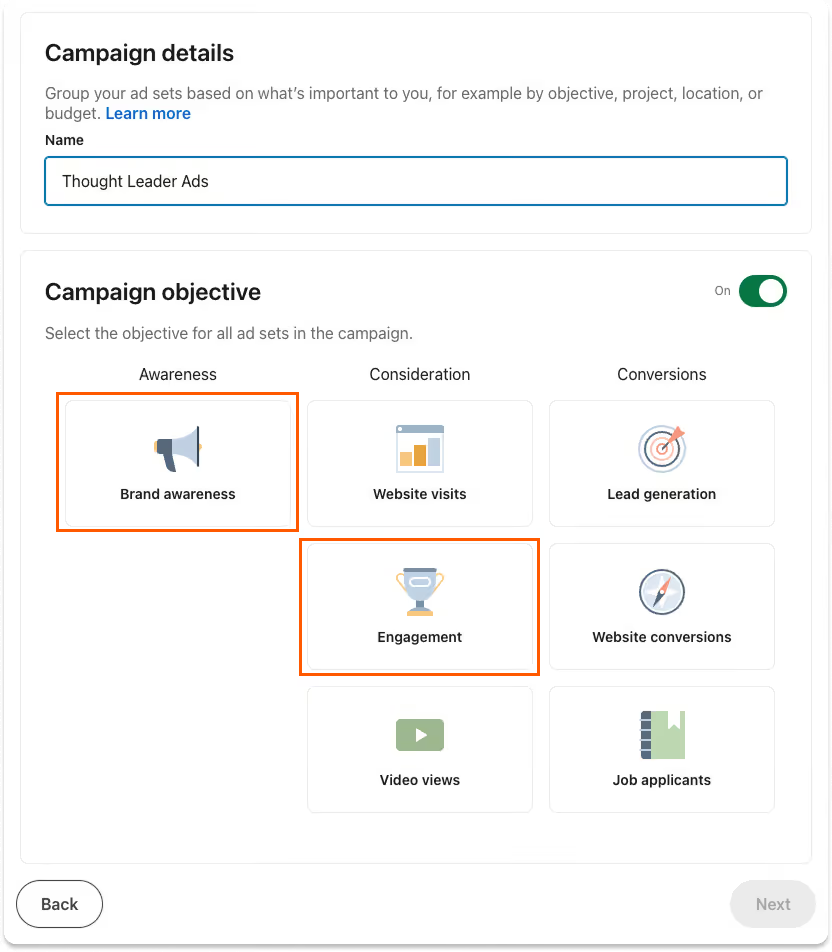
There's an ongoing discussion among advertising experts about which one is actually better for Thought Leader Ads. Honestly, we've had great results with both and mediocre results with both. They're just optimizing for different things. We'll show you how to set up both properly so you can test what works best for your audience.
Pick one and move on. You can always create a second campaign with the other objective later.
Next, choose "Run continuously from a start date." Thought Leader Ads work through repeated exposure over time. You want ongoing presence, not a short burst.
Make sure budget optimization is turned off. You want to control the budget at the ad set level, not let LinkedIn distribute it for you.
When asked to select an ad set type, choose "Classic."
Click Next in the bottom right. This takes you into the ad set setup.
Step 2: Set up your ad set
Give your ad set a name. Something descriptive like "TLA - Brand Awareness - CEOs DACH" helps you keep track of things later.
Make sure "Connected TV only" is turned off. You want your ads in the LinkedIn feed, not on TV screens.
Now scroll down to the audience section. This is where it gets important.
Location: Before you select any country or region, switch the location type to "Permanent." This is easy to miss. You want to target people who actually live and work in that region, not someone who happened to visit for a conference last week. Then choose your geography. DACH, US, Europe, whatever your market is.
Building your targeting: Now you start adding your targeting criteria. Here's how the interface works:
- Inclusion: Select a criterion to add it as your first filter.
- Narrow: Click this to combine criteria (for example, company list AND job title). This adds an AND condition.
- Exclude: Click this to remove a specific group of people. This adds a hard exclusion.
Understanding the difference between inclusions and exclusions matters a lot. LinkedIn treats inclusions as recommendations and exclusions as hard rules. If you include "CEO" as a job title, LinkedIn sees that as a suggestion and might show your ad to similar titles too. But if you exclude "Intern" or "Student," LinkedIn will actually enforce that and never show your ad to those people.
So be generous with exclusions and intentional with inclusions. Don't go crazy adding inclusion filters trying to be hyper-specific. Keep it tight but not suffocating.
If you have a company list (which we recommended in the previous section): load your uploaded Matched Audience as your first inclusion. Then click Narrow and add Job Titles to narrow down to the right people within those companies.
If you don't have a company list: use Company Industries as your first inclusion, then narrow by Company Size and Job Titles. In most cases, that's all you need. The other targeting criteria like skills, interests, or groups might sound useful, but they tend to be unreliable and dilute your audience more than they help.
A note on Job Titles: LinkedIn doesn't match job titles exactly. They're treated more like clusters. When you target "CMO," LinkedIn might also show your ad to people with related titles it groups under the same umbrella, like "Chief Marketing Officer," "VP Marketing," or "Head of Marketing." That's usually a good thing, but just know that you're not targeting an exact string match.
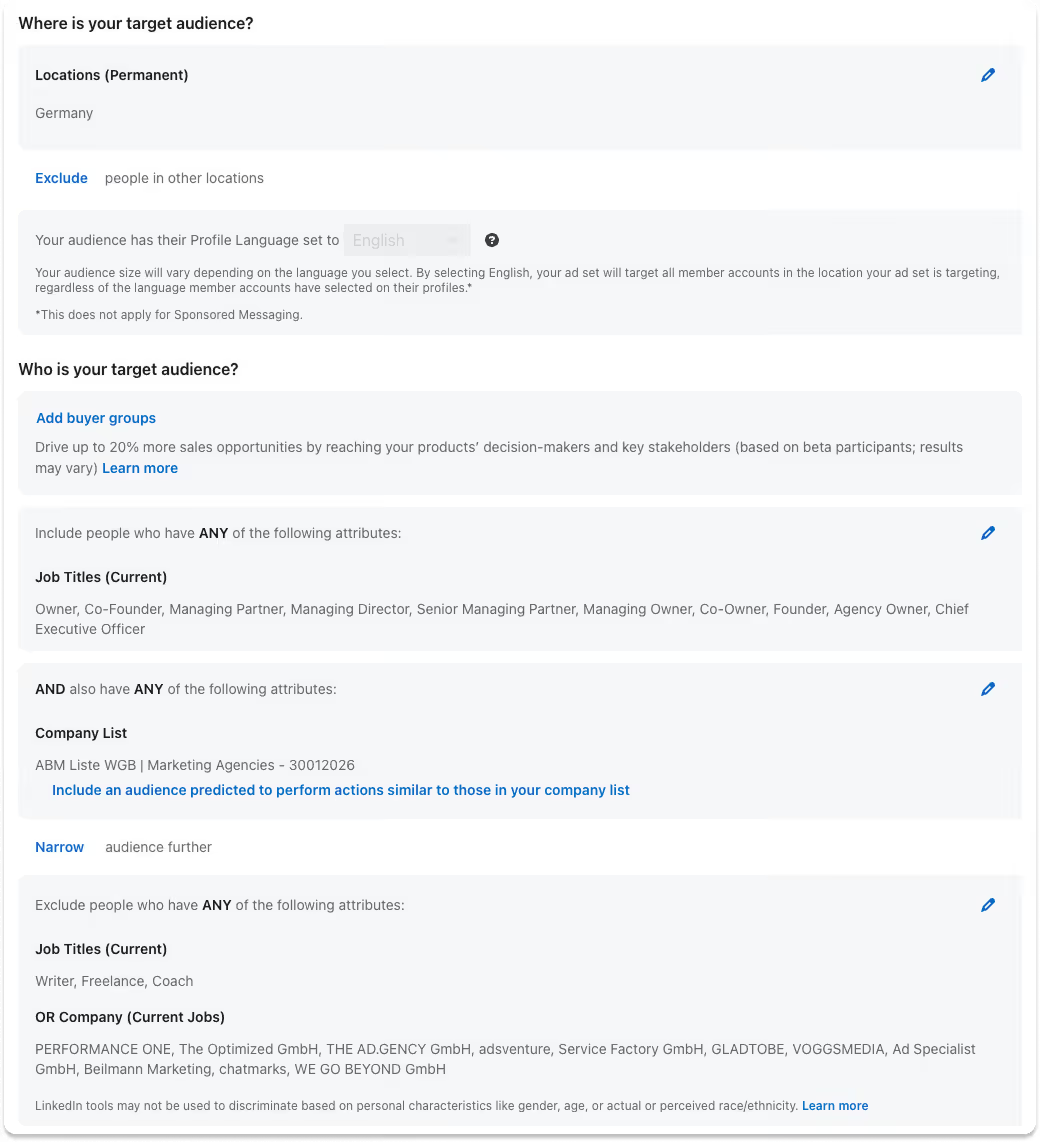
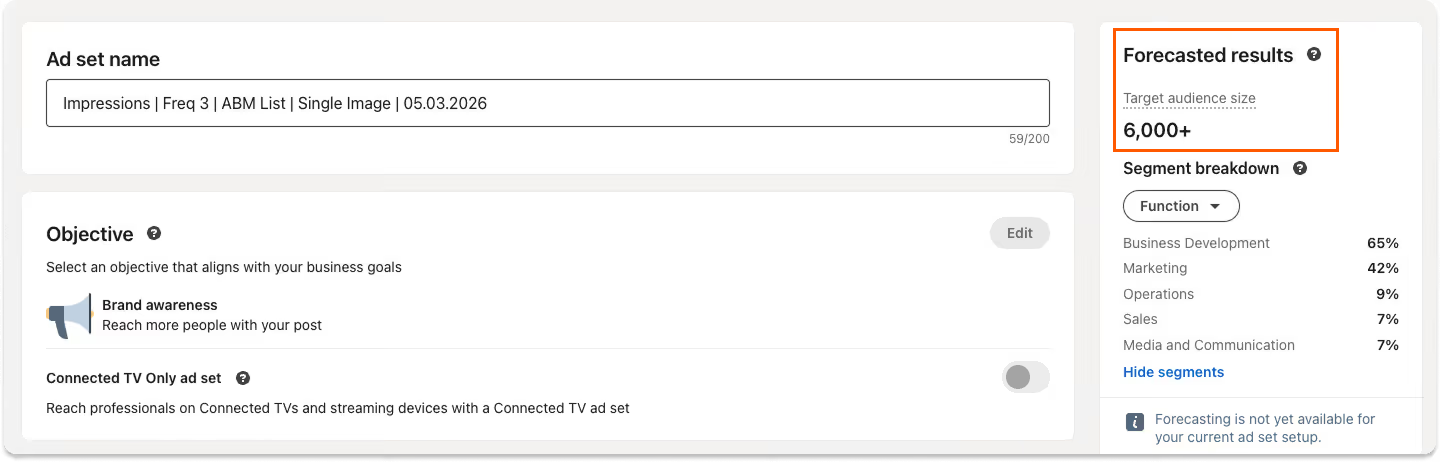
Check your forecasted results: On the right side of the screen, you'll see a panel with forecasted results. It shows your estimated audience size and projected impressions. These numbers aren't perfectly precise, but they're your best indicator for whether your audience is in the right range. This is where you want to see 2,000 to 10,000 people. If it's way above that, tighten your targeting. If it's way below, broaden your company list or loosen a filter.
Audience Expansion: Turn it off. LinkedIn enables this by default and it basically lets LinkedIn show your ad to people outside your defined audience if it thinks they're similar. That defeats the entire purpose of what we're doing here.
Ad Format: Choose Single Image Ad or Video Ad, depending on what kind of posts you're planning to promote. If you mostly publish text posts with an image, go Single Image. If you publish video content, go Video.
Placements: Turn off LinkedIn Audience Network. This would show your ads on third-party websites and apps, which is not what you want for Thought Leader Ads.
A good rule of thumb for most settings in Campaign Manager: if LinkedIn is recommending you turn something on, you probably want to turn it off. LinkedIn's defaults are designed to spend your budget quickly, not to spend it wisely.
Budget, bidding, and frequency:
Always set a daily budget, not a lifetime budget. Daily budgets give you control and predictability. The minimum daily budget on LinkedIn is €10.
But how much should you actually spend? Let's do the math.
Calculating your daily budget (Brand Awareness):
If you're running a Brand Awareness campaign, the calculation is straightforward. You need four numbers:
- Your audience size. Let's say it's 3,000 people (from the forecasted results panel).
- Your reachable audience. Not everyone in your audience is active on LinkedIn every month. A realistic assumption is that you can reach about half of them. So: 3,000 x 0.5 = 1,500 reachable people.
- Your desired monthly frequency. We said we're aiming for 5 to 7 touchpoints per month. Let's go with 5. So: 1,500 x 5 = 7,500 total impressions per month.
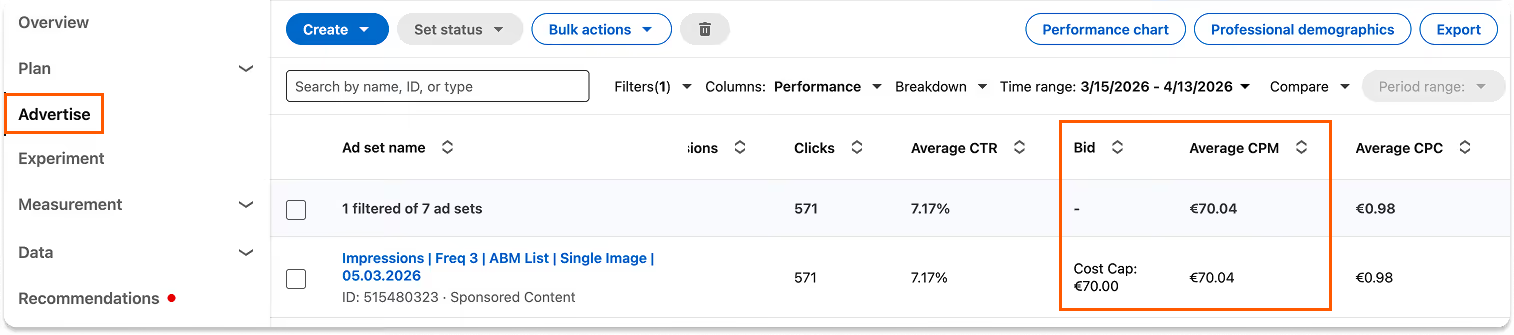
- The recommended CPM. When you set up your bidding, LinkedIn shows you a recommended bid. This is your CPM (cost per 1,000 impressions). On LinkedIn, a realistic CPM for B2B audiences is around €75.
Now the calculation:
7,500 impressions / 1,000 = 7.5
7.5 x €75 (CPM) = €562.50 per month
€562.50 / 30.5 days = ~€18.50 per day
In this example, you'd set your daily budget to around €18-19. If your audience is bigger or your desired frequency is higher, the number goes up. If your audience is smaller, it goes down.
For a smaller audience of around 2,000 people, the math works out to roughly €10-12 per day. So you can genuinely start with the minimum budget of €10/day and still get meaningful results. For larger audiences closer to 10,000 people, you'll need €50 to €60 per day to maintain the same frequency.
Calculating your daily budget (Engagement):
With Engagement campaigns, it's a bit different because LinkedIn doesn't show you the CPM upfront. You won't have that number until the campaign has been running for a few days.
So here's what we recommend: start with €10/day (that's the minimum). Let the campaign run for 3 to 5 days. Then check your actual CPM in the campaign reporting (we'll show you exactly where to find this in the measuring section). Once you have your real CPM, do the same calculation as above and adjust your daily budget to whatever the math tells you.
Bidding strategy:
Now, the bidding approach depends on which objective you chose.
If you chose Engagement:
Use manual bidding. Set your bid to roughly two thirds of what LinkedIn recommends. LinkedIn's recommended bid is designed to win auctions easily, which means it's usually higher than what you actually need to pay.
After a few days, check two things:
- Is your daily budget being spent? If your full daily budget is being used each day, you're doing fine. If it's not fully spent, your bid is too low and LinkedIn can't win enough auctions. Increase it a bit.
- What's your actual CPC (cost per click)? If your actual CPC is significantly lower than your bid, that's a sign you have room to decrease your bid further. Do this gradually, not in big jumps.
It's a bit of a dance at the beginning. Start conservative, check the numbers after a few days, and adjust.
If you chose Brand Awareness:
For the optimization goal, choose Impressions (not Reach). This gives you more control over how your budget is spent.
Set a frequency cap. This is, in our opinion, the single biggest advantage of Brand Awareness campaigns over Engagement campaigns. A frequency cap limits how often the same person sees your ad per week.
We recommend a cap of 3 to 5 impressions per 7 days. That means each person in your audience will see your ad a maximum of 3 to 5 times per week. Enough to build familiarity, not so much that it gets annoying.
For bidding, use Cost Cap. Here's why: with manual bidding on Brand Awareness campaigns, LinkedIn doesn't let you set your bid higher than your daily budget. At €10/day, that's often not enough to win auctions consistently. Cost Cap solves this by letting LinkedIn flex the individual bid while staying within your average cost target.
Set your cost cap to about two thirds of what LinkedIn recommends. Then monitor the same way: is your budget being spent? What's your actual CPM? Adjust accordingly.
Click Next in the bottom right.
Step 3: Select your posts
Now for the part that makes this a Thought Leader Ad.
Click "Browse existing content." Then select "LinkedIn members" (not your company page). Search for your name.
You'll see a list of your recent posts. Pick the ones you want to promote. We recommend selecting 3 to 5 posts to give LinkedIn some variety to work with and to keep your audience from seeing the same post over and over.
Not every post makes a good Thought Leader Ad. The best candidates are:
- Educational posts that teach your audience something valuable
- Perspective posts where you share a point of view on your industry
- Story-based posts that illustrate a lesson through a real experience
- Posts that performed well organically — this is a good signal that the content resonates, though it's not the only criterion
Posts that already have likes and comments carry that social proof into the ad, which makes them more compelling when new people see them.
Formats that work: single image, video, text-only, articles, and newsletters.
Formats that don't work: carousels/documents, polls, multi-image posts, reshares, and celebration posts. LinkedIn doesn't support these for Thought Leader Ads.
When you select your posts, LinkedIn will ask you to enable sponsorship from your personal profile. You'll receive an email with a link, or you can generate a direct link right there in Campaign Manager. Click it, approve the request, and you're good to go.
Pro tip: choose to accept all future requests from your company. That way you won't have to go through this approval process every time you want to promote a new post. Definitely recommend doing this.
Once your posts are selected, click "Add to ad set" and then click Next in the bottom right.
Step 4: Review and launch
You'll see an overview of all the ads you've chosen. Confirm your selection and click Next again.
Now you get a full overview of your entire ad set: audience, budget, bidding, schedule, and selected posts. Take a minute to review everything.
If it all looks good, click "Launch Ad Set."
LinkedIn will ask you to confirm that your advertising is not related to political campaigns. Confirm that, and you're done.
LinkedIn reviews your ads, which usually takes 24 to 48 hours. Once approved, your campaign goes live and your content starts showing up in your dream customers' feeds.
One last thing: don't check your campaign every hour. Give it a few days to get going. LinkedIn's algorithm needs some time to optimize delivery. Check in once a week, review the numbers, and adjust your bids if needed based on what we discussed above.
Your first Thought Leader Ad is live. Your dream customers are about to start seeing your name in their feed, week after week. Now let's talk about how to measure whether it's actually working.
Measuring Success
Your campaign is live. Now what? How do you know if it's actually working?
Let's talk about what to measure, where to find it, and how to interpret the numbers.
Setting up your reporting window:
First things first. When you open Campaign Manager and look at your campaign reporting, the first thing you should do is set the date range. You'll find it in the top right corner of the reporting view. Set it to the last 30 days. This gives you a meaningful sample size without diluting your data with months of history. You can always change the window later, but 30 days is your default for ongoing monitoring.
The metrics that matter:
Here are the metrics you should pay attention to, and what they tell you:
- Impressions — the total number of times your ads were shown. This is your raw volume number. On its own it doesn't tell you much, but it feeds into the other metrics below.
- Reach — the number of unique people who saw your ads. This is different from impressions because the same person can see your ad multiple times. If you have 7,500 impressions and a reach of 1,500, that means 1,500 different people saw your ads, on average 5 times each.
- Audience Saturation — this tells you what percentage of your target audience you're actually reaching. If your audience is 3,000 people and your reach is 1,500, your saturation is 50%. This is one of your two north star metrics. You want this as high as possible. If it's below 30-40%, you're not reaching enough of your audience and need to either increase your budget or tighten your targeting. Keep in mind that numbers above 50-60% are usually not realistic because not everyone in your audience is active on LinkedIn. If you're hitting 50%+, you're doing great.
- Frequency — the average number of times each person in your reach has seen your ads. This is your other north star metric. We're aiming for 5 to 7 per month. If your frequency is 2, people aren't seeing you enough. If it's above 10, you might be overexposing and wasting budget.
- CTR (Click-Through Rate) — the percentage of people who clicked on your ad after seeing it. In the context of Thought Leader Ads, a high CTR tells you that your content is interesting enough for people to want to read more, visit your profile, or engage further. Aim for a CTR above 0.5%. If it's consistently below that, your content might not be resonating with this specific audience and you should test different posts.
- Dwell Time — how long people spend looking at your ad before scrolling past. This is a subtle but powerful metric. A high dwell time means people are actually stopping to read your content, not just scrolling past it. It tells you whether your content is relevant to your ICP and whether it's sticking. Aim for a dwell time above 3 seconds. If people are spending time with your ads, you're building familiarity and trust, even if they don't click or engage.
- Other Engagement — likes, comments, shares, follows. These are nice to have and they add social proof to your posts (which makes them even more effective as ads). But they're secondary to your north stars of saturation and frequency.
To summarize: audience saturation and frequency are your north stars. They tell you whether you're reaching enough dream customers often enough. Dwell time and CTR are your quality indicators. They tell you whether your content is actually relevant and resonating with your ICP.

Where to find these numbers:
In Campaign Manager, navigate to your campaign and click into your ad set. You'll see a reporting table with columns showing your key metrics. Impressions, reach, frequency, CTR, and engagement numbers are all visible in the default columns. Dwell time and audience saturation can be found in the performance view of your ad set.
Make sure you're looking at the right time window. Set it to 30 days.
The Company Tab: your secret weapon
Here's where things get really interesting. Inside Campaign Manager, there's a Company Tab that shows you which companies are engaging with your ads.
This is incredibly valuable because it bridges the gap between ad metrics and real business outcomes. You're no longer looking at anonymous numbers. You're looking at actual company names.
Here's how to set it up:
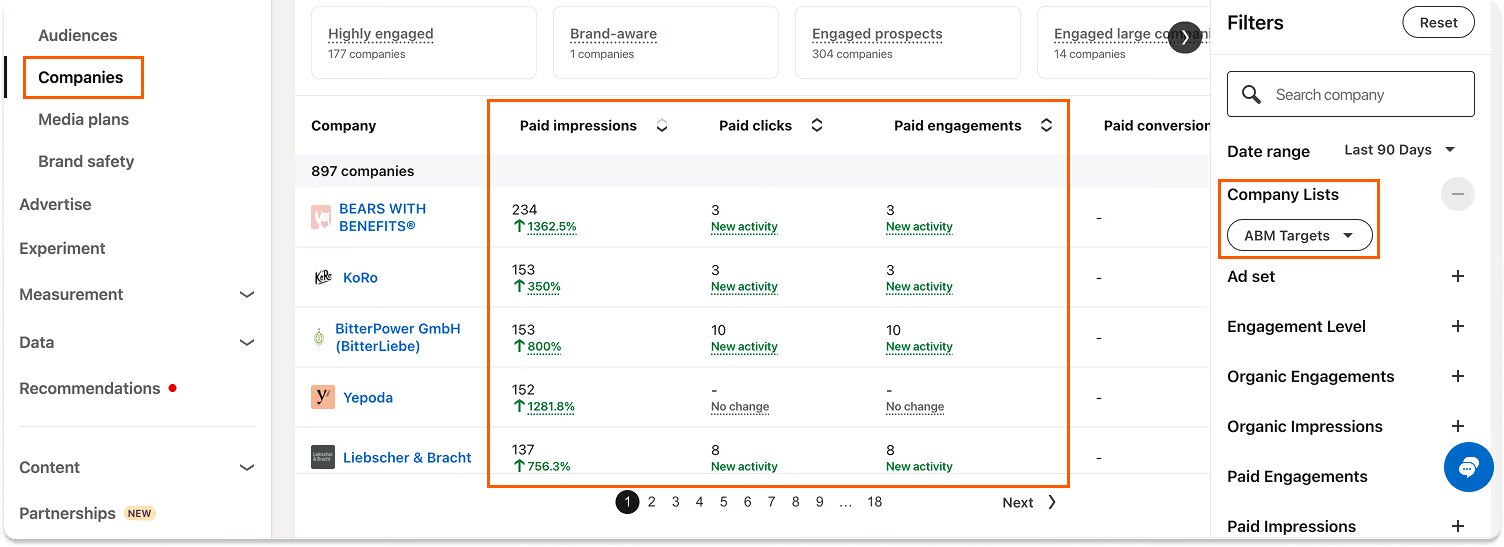
- Set the date range to the last 90 days (top right). You want a longer window here than for your regular reporting because you're looking at cumulative engagement over time.
- On the right side, select the Company List you uploaded as your Matched Audience. This filters the view to only show companies from your target list.
- Select your ad set to see engagement specific to your Thought Leader Ad campaign.
- Sort by "Paid Impressions" or "Paid Engagements." These are the two metrics you're looking at here. Sorting by impressions shows you which companies have seen your content the most. Sorting by engagements shows you which companies are actively interacting with it.
One important thing to understand: the Company Tab shows you companies, not specific people. You can see that someone at Acme Corp engaged with your ad, but you can't see who exactly. So you have to make the connection yourself. If you're targeting the CMO at that company, and you see Acme Corp showing up with high engagement, the CMO is the person you should connect with.
Here's what you can do with this information:
- Connect with engaged people on LinkedIn. If a company shows high impressions and engagement, find the specific people you're targeting at that company (the CMO, the CEO, whoever your ICP is) and send them a connection request. They've likely been seeing your content for weeks or months. They'll probably recognize your name and accept. This doesn't feel cold because it isn't.
- Reach out to warm leads. If a company has been consistently engaging with your ads for a couple of months but nobody from that company has reached out to you, consider making the first move. A friendly, non-salesy DM referencing something you posted about (that they likely saw) can start a real conversation. This is the opposite of cold outreach. These people have been warmed up by months of your content.
- Prioritize your sales efforts. If you're doing any kind of outbound, the Company Tab tells you where to focus. Companies that have high engagement with your ads are far more likely to be receptive than companies that have never heard of you.
Comparing to your CRM: influenced pipeline
This is where you measure real business impact.
Take the companies showing up in your Company Tab and cross-reference them with your CRM. Specifically, look at people who have booked a call, entered your pipeline, or become a customer since you started running Thought Leader Ads.
Now check those names against the Company Tab. How many paid impressions did they have? How many paid engagements?
You can set a simple threshold to define "influenced." For example: 10 or more paid impressions and 3 or more paid engagements in the last 90 days. If a company meets that threshold and someone from that company booked a call, it's reasonable to say your Thought Leader Ads influenced that conversion. Maybe they didn't click your ad and fill out a form. But they saw your name in their feed dozens of times, read your content, and when the need arose, they thought of you.
This is what we call influenced pipeline. It's different from direct attribution (where someone clicks an ad and immediately converts). In B2B, direct attribution almost never happens for high-ticket services. But influence is real, it's measurable, and over time it becomes the most powerful driver of inbound leads.
Realistic expectations:
Let's be honest about timelines so you don't get discouraged.
The first few weeks: focus entirely on your ad metrics. Is your budget being spent? Is your CPM in a reasonable range? Is your frequency building? Is your saturation growing? These are the only things that matter right now. Don't look for leads. There won't be any yet.
After one to two months: you'll start seeing some engagement trickle in through the ads. Profile visits from people at target companies. The occasional connection request from someone you've never spoken to but who's been seeing your content. Maybe a comment on one of your promoted posts. These are early signals that the trust-building is working.
After three to six months: this is where the real results start showing up. Inbound messages from dream customers who feel like they already know you. Discovery calls where the prospect says "I've been seeing your posts." Pipeline influenced by your ads that you can track in your CRM.
Don't expect instant results. Influenced pipeline takes months to build. But once it starts compounding, it doesn't stop. And that's the whole point of this approach.
Now It's Your Turn
You now have everything you need to get started with Thought Leader Ads. The strategy, the setup, the math, and the metrics. No excuses left.
But here's the thing. Thought Leader Ads don't exist in a vacuum. They reach their full power when combined with three things:
- Great content. The ads can only amplify what's already there. If your posts are generic or surface-level, putting paid distribution behind them just means more people see mediocre content. But if your content is sharp, insightful, and genuinely valuable to your ICP, Thought Leader Ads become a multiplier for trust.
- Signal-based outreach. Remember the Company Tab? The companies engaging with your ads are giving you buying signals. Combining Thought Leader Ads with smart, signal-based outreach means you're never reaching out cold again. You're reaching out to people who already feel like they know you.
- Continuous optimization. This isn't a set-it-and-forget-it channel. The best results come from regularly reviewing your metrics, testing new posts, refining your audience, and adjusting your budget based on what the data tells you. Small tweaks compound into big differences over time.
When all three come together, you have a system that consistently puts you in front of your dream customers, builds real trust, and turns that trust into pipeline. That's what we call The Trust Engine.
We help B2B founders do exactly this on LinkedIn. Strategy, content, Thought Leader Ads, and outreach, all working together as one system.
If you want help building yours, let's talk.
Book a free strategy call at the top of the page.